Madoc v2.4
Madoc v2.4 focuses on improving project administration, contributor workflows, search and discovery, and the overall usability of capture-model and tabular data projects. This release introduces configurable project search, project configuration import/export, image rotation tools, improved project updates, enhanced collection import workflows, and a range of refinements to contribution, review, and administration experiences. The v2.4.1 through v2.4.5 patch releases follow with fixes for capture-model fields and project update schemas.
- 🔍 Enhanced project search - Configurable project-level search experiences with administrator-managed tabs, facets, result layouts, resource filters, and improved project-specific discovery.
- ⚙️ Enhancements to project administration - Import and export project configurations, settings, and templates, along with richer project updates and improved import workflows.
- 🖼️ Improved contributor experience - Resizable workspace to enable more use of available screen space, image rotation, improved review layouts, and enhanced manifest navigation.
- 📊 Additional tabular project tooling - New multi-cell copy/paste controls, image margin alignment tools, image grid adjustment, and improved table row-tracking behaviour. Addition of tabular data project model editing to allow in-flight project updating of instructions and help text.
- 🎨 Site configuration and branding - New accent colour configuration, enhanced navigation controls, and improved presentation options throughout the platform.
- ✅ Reliability and quality improvements - Extensive fixes across contribution workflows, capture models, imports, search indexing, editor functionality, and project updates.
Added
Flexible project search
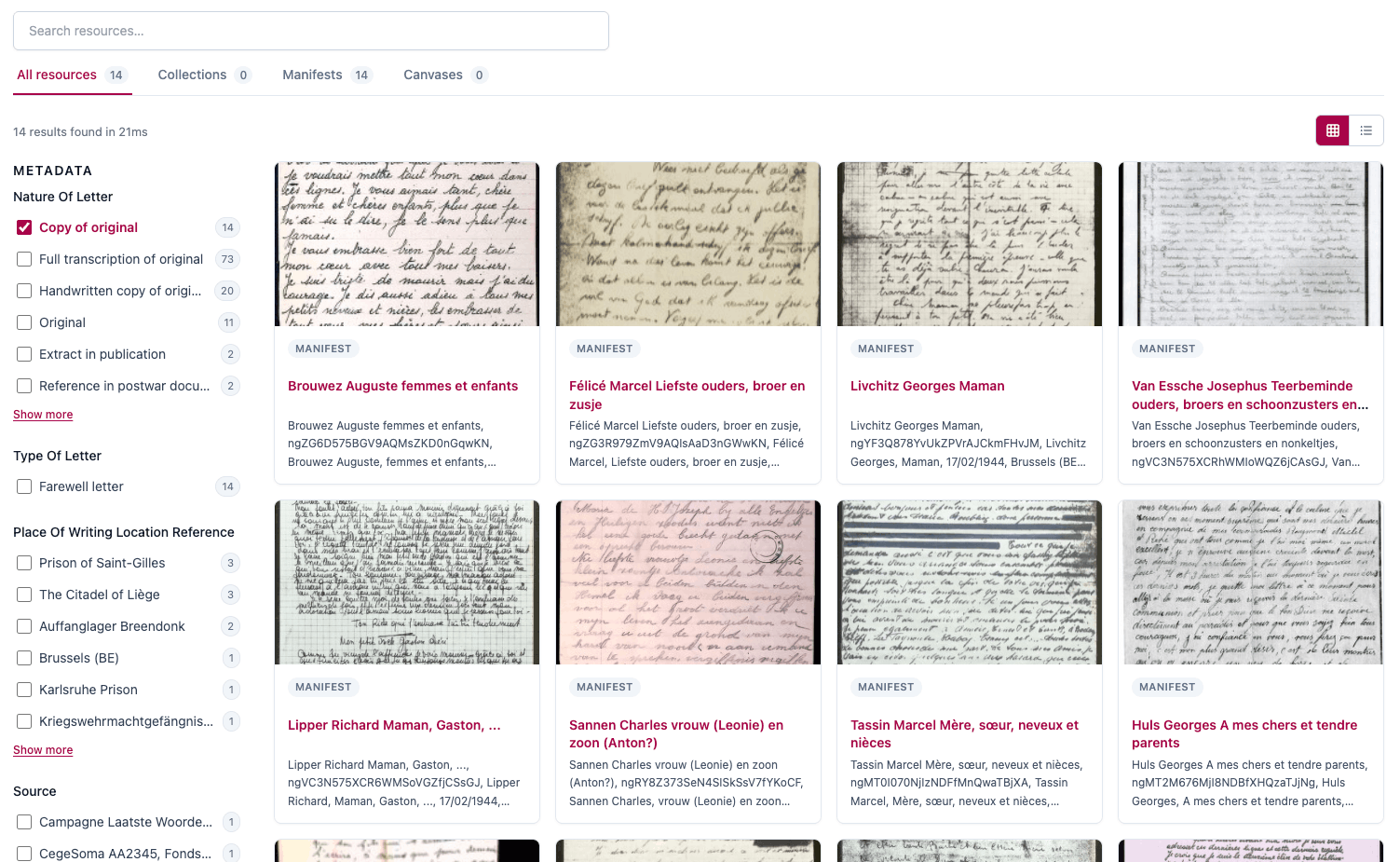
Madoc now includes a configurable project search experience that can be tailored by administrators. Search tabs, resource filters, metadata facets, result counts, display modes, thumbnails, and optional infinite scrolling can all be configured to suit individual projects.
Project search has also been refined to ensure autocomplete suggestions, search results, and resource links stay within the context of the current project, providing a more focused and relevant discovery experience.
Enhanced contributor workspaces
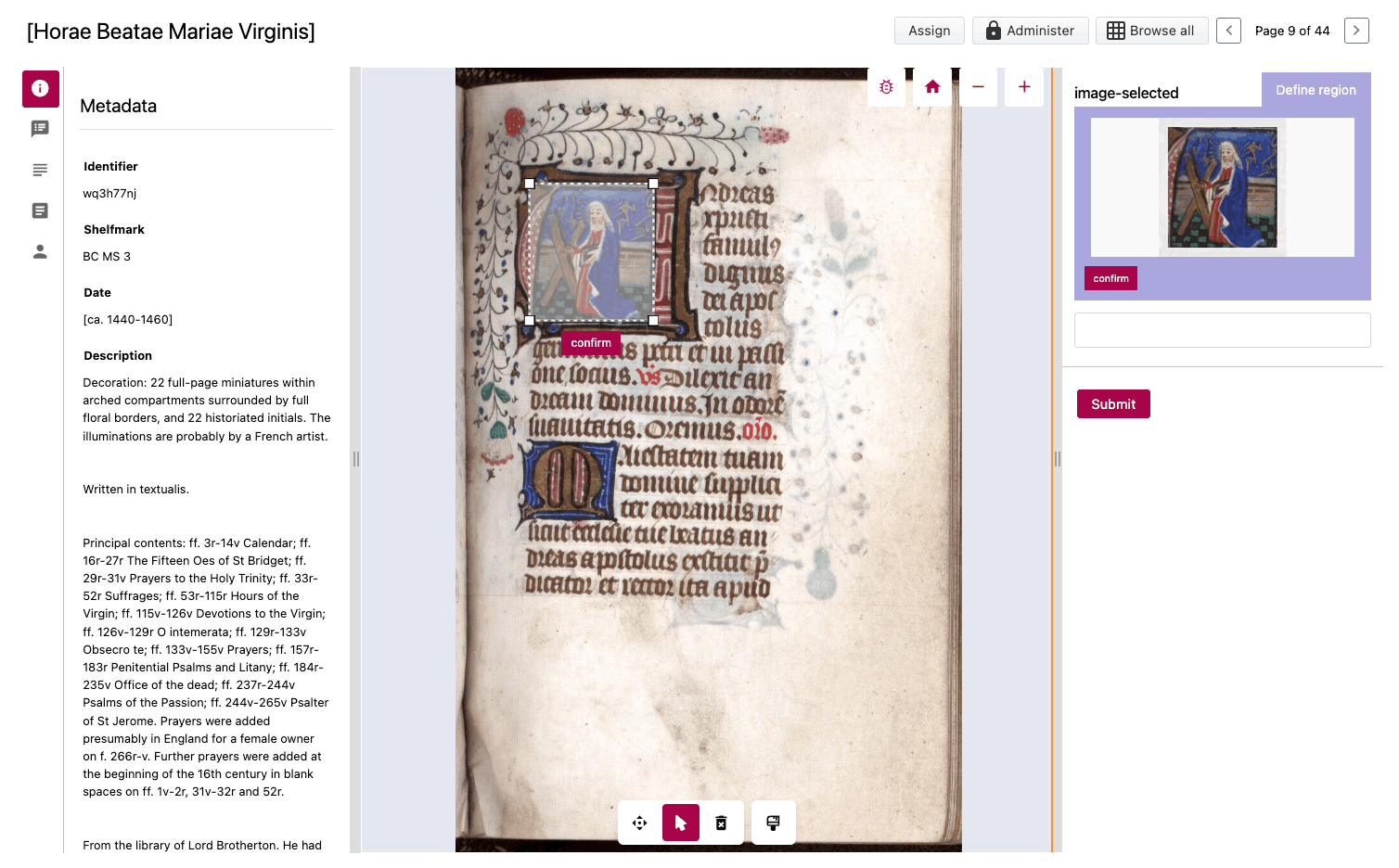
Madoc now supports panel resizing across contribution, preview, review, and tabular editing interfaces. Contributors and reviewers can tailor their workspace layout to better suit different content and workflows.
Image rotation has also been introduced for contribution previews and review interfaces, providing a straightforward way to work with rotated source material, complete with reset controls and visual indicators.
Improved project updates
Project updates have been expanded with:
- Optional update titles
- Rich text formatting
- Edit and preview modes
- Administrator editing and deletion
- Immediate page refresh after publication
These improvements provide greater flexibility when communicating project news and updates to participants.
Tabular project contribution enhancements
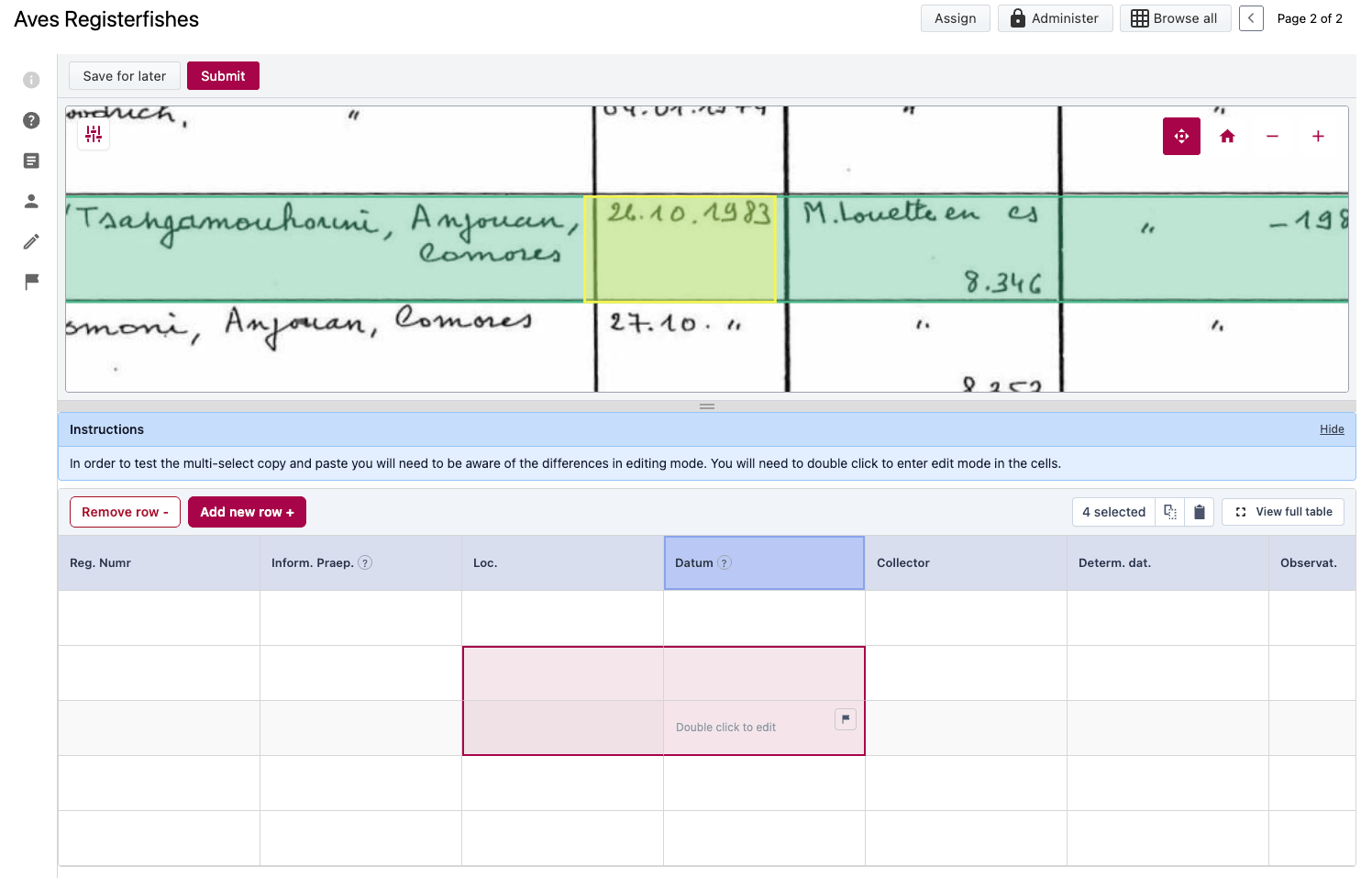
Several improvements have been introduced for tabular data projects, including:
- Multi-cell copy and paste functionality
- Paste into selected cells
- Visual success and failure feedback
- Image alignment tools enhanced to include image margin (left, right) adjustment controls
- Improved visual indicators to support interactions
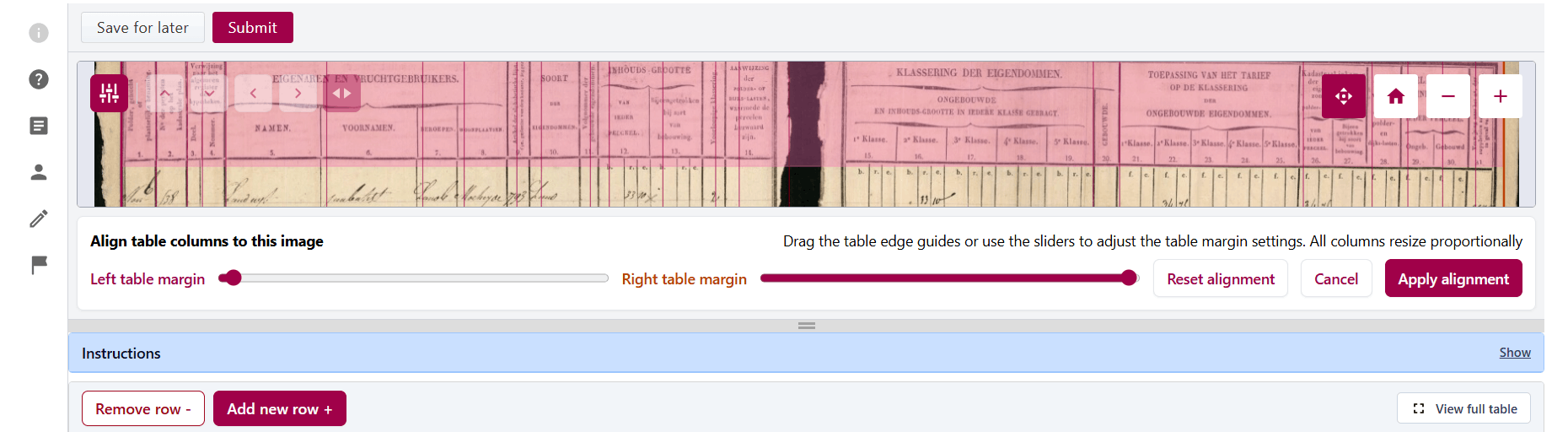
These additions make it easier to correct alignment issues with digitised material and work efficiently with structured tabular content.
Additional site configuration options
New administration capabilities include:
- Configurable site accent colours applied across administration areas, navigation, and search
- Controls to open links in new browser tabs from HTML blocks, Markdown blocks, project updates, and footer links
- Expanded "Open in Theseus" support across collections and project resources, and added an option to hide the Theseus action where not required
- Contributor workflow improvements
An optional Save for later button can now be displayed alongside the standard submit action, allowing contributors to save their progress without completing a submission.
Project configuration import and export
Improvements to import and export project configurations as JSON. Imported settings are safely merged while preserving protected project values, making it easier to replicate project setups, share configurations between environments, and maintain consistent project structures.
Global and site settings can also be imported and exported, with improved handling for project template types when templates are re-imported.
Changed
Collection and manifest import workflows
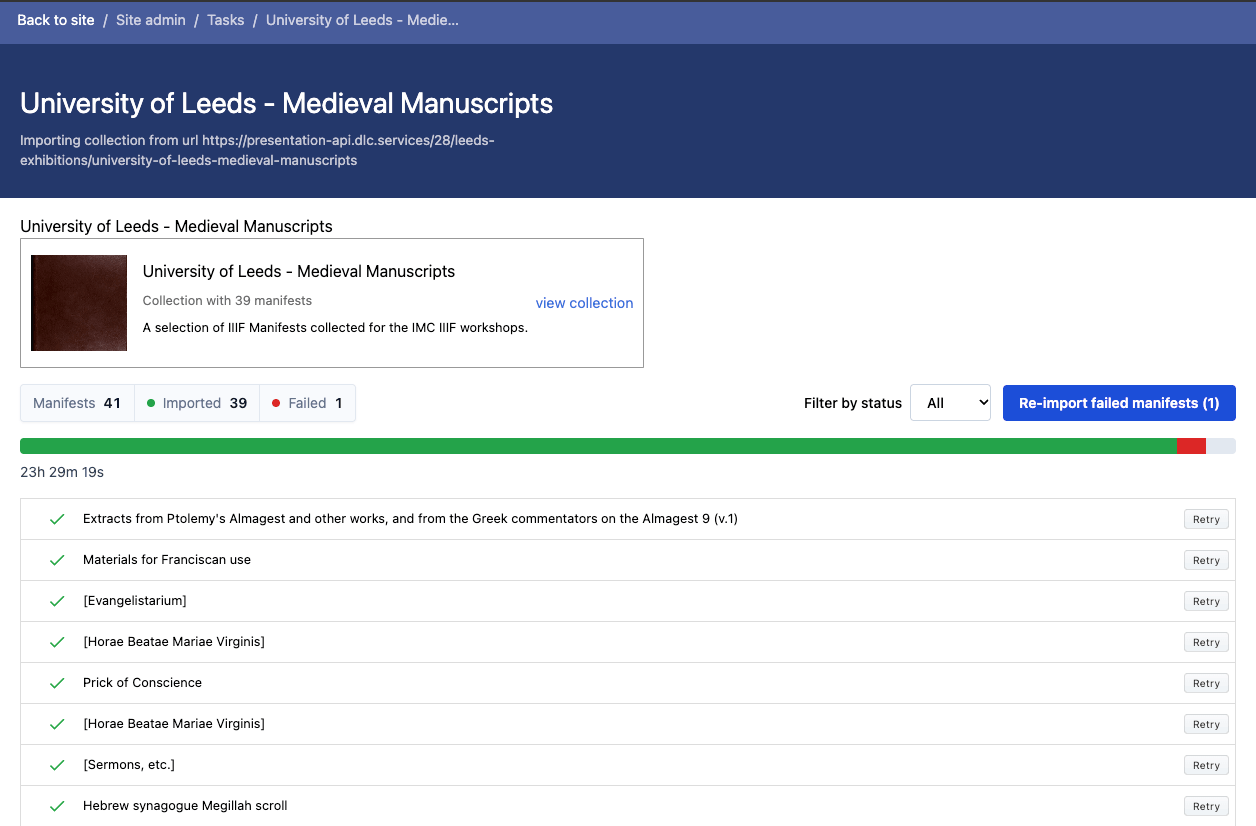
Collection and manifest importing has been significantly improved with:
- Automatic retry handling
- Better reporting of failed imports
- Clearer progress feedback
- Import status filtering
- Pagination support
- The ability to retry failed manifest imports
These enhancements make large-scale ingest workflows more manageable and transparent.
Review and contribution experience
Capture-model contribution and review screens have been refined with:
- Clearer field presentation
- Improved layouts
- Better handling of linked autocomplete values
The review dashboard now opens directly into the newer review listing experience, helping reviewers access outstanding work more quickly.
Manifest project usability
Manifest projects benefit from improved canvas navigation on smaller screens, with new canvas selection tools and previous/next navigation options available during review.
Search and discovery improvements
Search facet labels have been redesigned for improved readability, while facet groups that contain no available options are automatically hidden to reduce visual clutter.
Search indexing reliability has also been improved to ensure search results remain synchronized with project, collection, and resource changes.
Accessibility and localisation
Accessibility improvements include:
- Better keyboard support for column-description tooltips
- Improved tooltip usability
- Enhanced translation refresh behaviour across sites, accounts, and administration areas
Updated English, Welsh, and Dutch language catalogues are included, with French also added.
User interface refinements
Additional usability improvements include:
- Increased tabular column heading limits
- A clearer Personal Notes icon
- Enhanced status indicators for manifests and canvases
- Improved handling of changes-requested workflows
Fixed
Contribution and review workflow fixes
A number of issues affecting contributor workflows have been resolved, including:
- Draft submissions disappearing after save
- Incorrect contribution expiry handling
- Reviewer-requested changes being shown as completed work
- Capture-model revision updates losing field ordering or nested properties
- Capture-model checkbox values not being saved correctly (v2.4.1)
Tabular project fixes
Several fixes improve the stability and accuracy of tabular projects:
- Correct CSV exports with complete column sets
- Preservation of blank rows in exports
- Correct annotation positioning after publication
- Improved image alignment behaviour
- Improved row tracking during zooming and alignment adjustments
Capture-model fixes
A range of capture-model editing issues have been addressed, including:
- Field focus being lost during editing
- Optional-region validation problems
- Missing field headings
- Autocomplete placeholder issues
Content editing fixes
Reliability improvements have been made across:
- HTML blocks
- Markdown blocks
- Link creation workflows
- Rich-text editor loading
- Spacer and divider rendering
Site and account fixes
Resolved issues include:
- Duplicate site titles appearing in themed headers
- Incorrect site identification on account pages
- Activity-feed links
- External client access
- Footer logo links
Search, IIIF, and resource fixes
Additional fixes include:
- IIIF Browser integration improvements
- Manifest previews showing accurate page totals
- More reliable search indexing
- Updated user-facing IIIF Browser labels